Back to regopc projects
regopc / ENGINEERING CASE / TEMPLATE

From an APK
to a loadable plugin.

Automate the repeated work of editing code, preparing resources, and packaging builds. Built on Shadow, Template integrates an existing app into a plugin project so its features can run inside a host app.

Automated APK processing

Decode, integrate resources, process bytecode, and recompile.

Connected build tasks

Custom Gradle plugins coordinate tasks and integrate Shadow artifacts.

Less repeated work

Reduce manual editing and packaging with a repeatable, maintainable process.

01How the system fits together

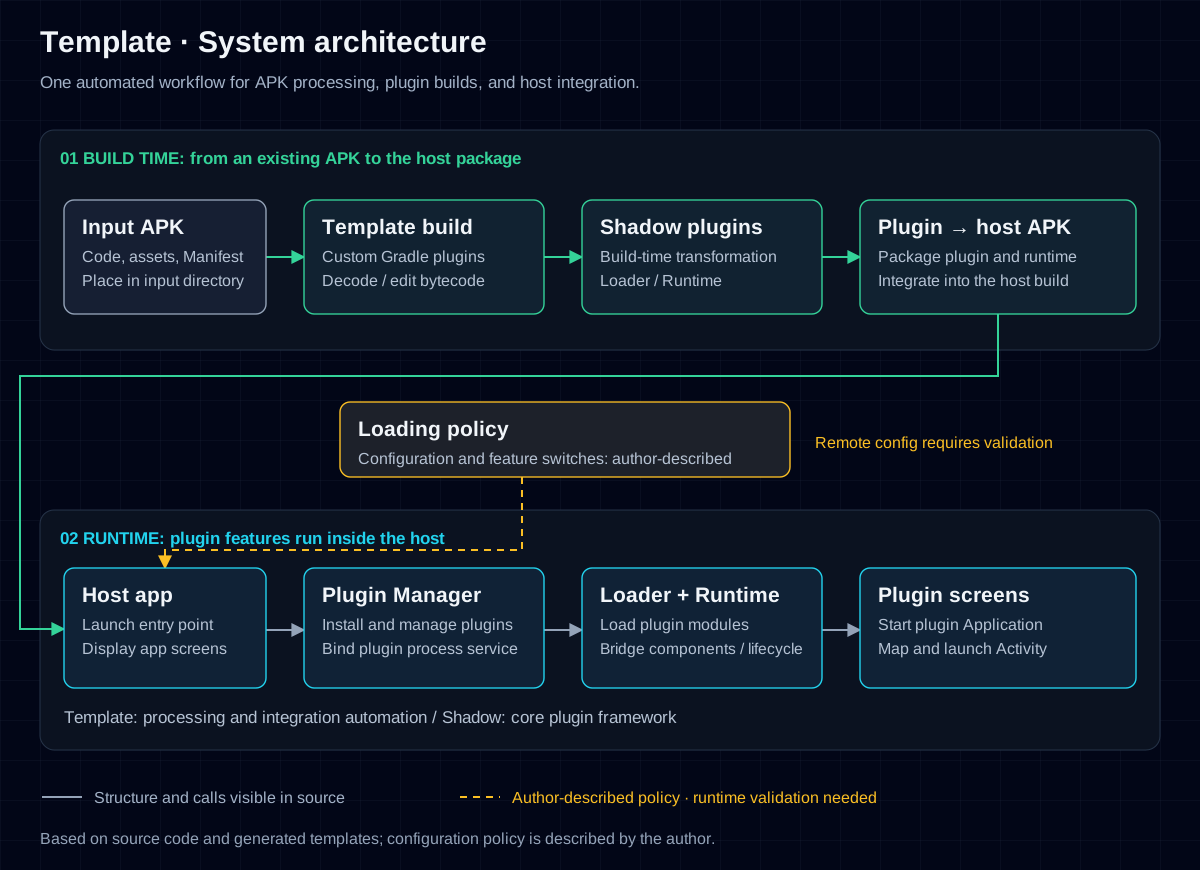
The build pipeline turns an APK into a plugin the host can load. At runtime, the host prepares the plugin, loads its runtime environment, and starts its screens.

Scroll the diagram horizontally, focus it and use the arrow keys, or open the original to zoom in.

Template · System architectureOne automated workflow for APK processing, plugin builds, and host integration.Template · System architectureOne automated workflow for APK processing, plugin builds, and host integration.01 BUILD TIME: from an existing APK to the host package02 RUNTIME: plugin features run inside the hostInput APKCode, assets, ManifestPlace in input directoryTemplate buildCustom Gradle pluginsDecode / edit bytecodeShadow pluginsBuild-time transformationLoader / RuntimePlugin → host APKPackage plugin and runtimeIntegrate into the host buildLoading policyConfiguration and feature switches: author-describedRemote config requires validationHost appLaunch entry pointDisplay app screensPlugin ManagerInstall and manage pluginsBind plugin process serviceLoader + RuntimeLoad plugin modulesBridge components / lifecyclePlugin screensStart plugin ApplicationMap and launch ActivityTemplate: processing and integration automation / Shadow: core plugin frameworkStructure and calls visible in sourceAuthor-described policy · runtime validation neededBased on source code and generated templates; configuration policy is described by the author.

Green shows the build pipeline; cyan shows the runtime path. Dashed yellow lines indicate the loading policy described by the author.

Open architecture diagram ↗

My contribution: Template’s automated processing, bytecode editing, build orchestration, and host integration. Shadow provides the underlying plugin framework.

Technical approach: Shadow uses a zero-hook plugin architecture to reduce reliance on system internals. “Zero-hook” describes the plugin mechanism; reflection may still be used to connect components.

02Add an APK and run the build

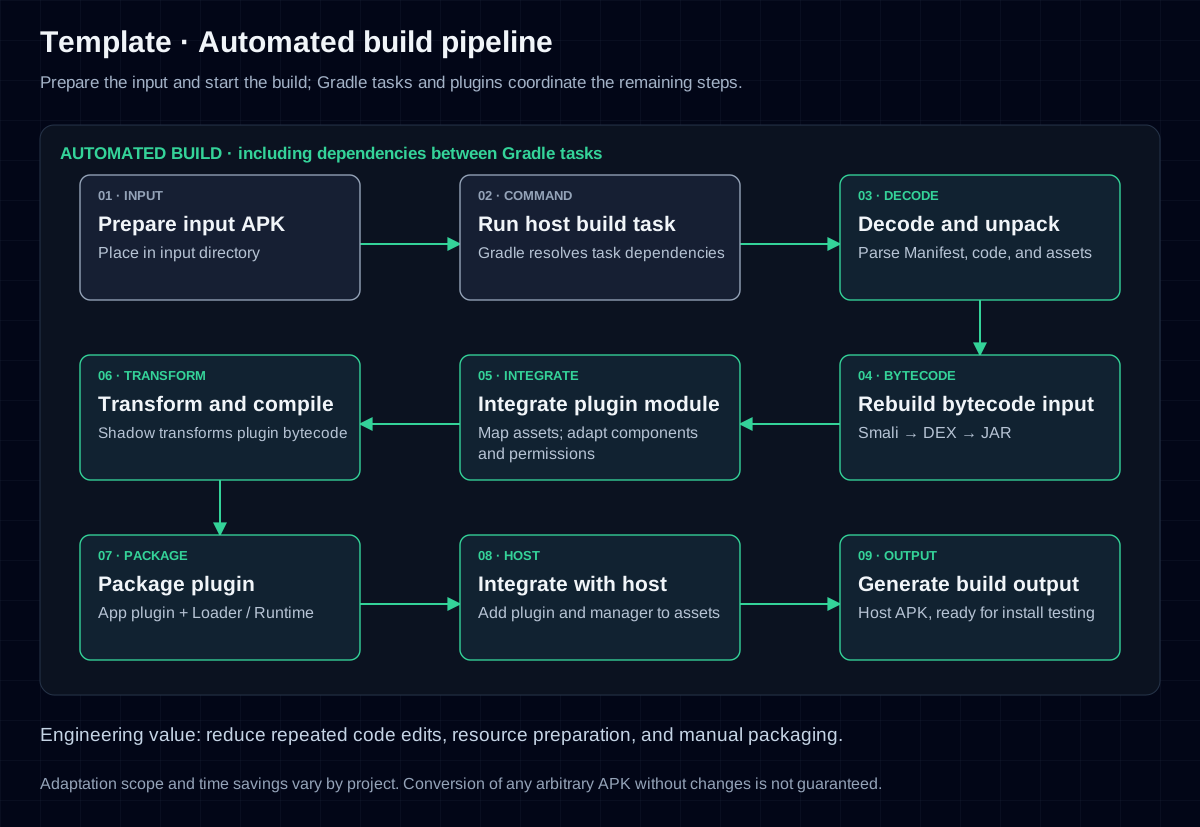
After decoding the APK, the project prepares its Manifest, resources, and bytecode for the plugin module. Custom Gradle plugins bring ASM-based bytecode editing into the build. Shadow then supplies the plugin transformation, and the packaged output is integrated into the host.

Scroll the diagram horizontally to see the full flow.

Template · Automated build pipelinePrepare the input and start the build; Gradle tasks and plugins coordinate the remaining steps.Template · Automated build pipelinePrepare the input and start the build; Gradle tasks and plugins coordinate the remaining steps.AUTOMATED BUILD · including dependencies between Gradle tasks01 · INPUTPrepare input APKPlace in input directory02 · COMMANDRun host build taskGradle resolves task dependencies03 · DECODEDecode and unpackParse Manifest, code, and assets04 · BYTECODERebuild bytecode inputSmali → DEX → JAR05 · INTEGRATEIntegrate plugin moduleMap assets; adapt componentsand permissions06 · TRANSFORMTransform and compileShadow transforms plugin bytecode07 · PACKAGEPackage pluginApp plugin + Loader / Runtime08 · HOSTIntegrate with hostAdd plugin and manager to assets09 · OUTPUTGenerate build outputHost APK, ready for install testingEngineering value: reduce repeated code edits, resource preparation, and manual packaging.Adaptation scope and time savings vary by project. Conversion of any arbitrary APK without changes is not guaranteed.

Reduce repeated processing: App processing, component adaptation, and packaging are brought into the build pipeline, reducing manual work on each project.

Bytecode editing: ASM reads class files, visits and modifies bytecode, and writes the result back into the build output. This forms the automated processing flow alongside decoding and resource integration. Shadow provides plugin transformation and runtime support.

What is processed: Decoded Smali, DEX, JAR, and resource files are processed and integrated into the plugin module. This does not reconstruct the complete original Java or Kotlin project.

03The host runs plugins on demand

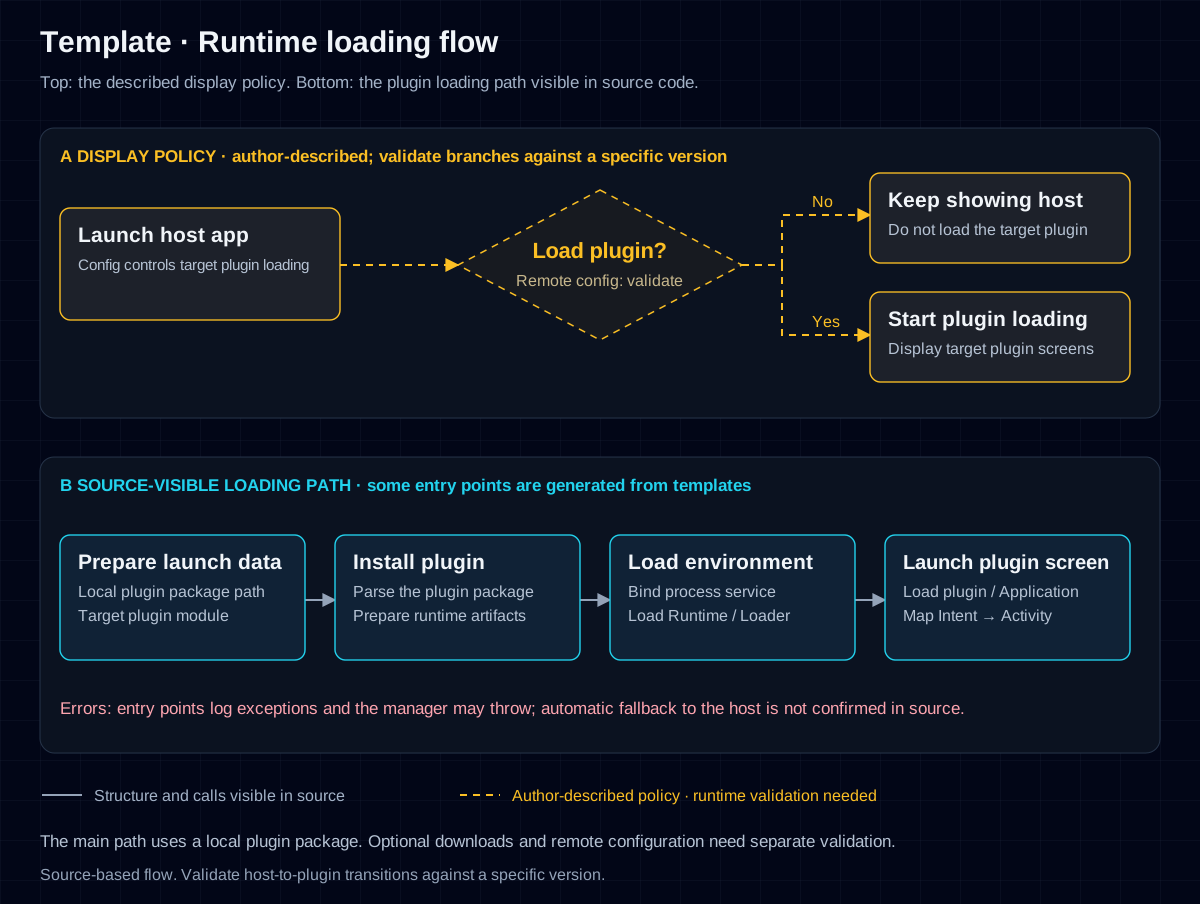
Under the project’s described loading policy, the app first shows the host, then configuration determines whether to load a target plugin. Dashed lines show this product policy; solid lines trace plugin installation, runtime loading, and screen startup visible in the source.

The configuration policy is described by the author. Remote configuration and conditional branches require validation against a specific version. The solid-line loading path is based on source code and generated templates.

Scroll the diagram horizontally to see the full flow.

Template · Runtime loading flowTop: the described display policy. Bottom: the plugin loading path visible in source code.Template · Runtime loading flowTop: the described display policy. Bottom: the plugin loading path visible in source code.A DISPLAY POLICY · author-described; validate branches against a specific versionLaunch host appConfig controls target plugin loadingLoad plugin?Remote config: validateKeep showing hostDo not load the target pluginStart plugin loadingDisplay target plugin screensNoYesB SOURCE-VISIBLE LOADING PATH · some entry points are generated from templatesPrepare launch dataLocal plugin package pathTarget plugin moduleInstall pluginParse the plugin packagePrepare runtime artifactsLoad environmentBind process serviceLoad Runtime / LoaderLaunch plugin screenLoad plugin / ApplicationMap Intent → ActivityErrors: entry points log exceptions and the manager may throw; automatic fallback to the host is not confirmed in source.Structure and calls visible in sourceAuthor-described policy · runtime validation neededThe main path uses a local plugin package. Optional downloads and remote configuration need separate validation.Source-based flow. Validate host-to-plugin transitions against a specific version.
Technical notes and scope

This case study draws on Template source code, generated templates, and the author’s description. Template handles automated processing, build orchestration, and host integration; Shadow provides the underlying plugin framework. The diagrams describe the engineering structure and flow. APK adaptation, Android compatibility, and configuration services require project-specific validation.

Working on a similar Android project?

Tell me about your app, the repeated work, and the process you want to improve.
Discuss your project